Call center automation AI is reshaping customer service by helping teams respond faster, resolve more issues on the first contact, and deliver more consistent experiences at scale. Instead of replacing human agents, modern AI is most effective when it automates repetitive work and augments agents with real-time guidance, knowledge, and next-best actions. A key component of this transformation is a What is an omnichannel contact center, which unifies interactions across voice, chat, email, and messaging to provide a seamless customer experience.
When implemented thoughtfully, call center automation AI can reduce average handle time (AHT), increase first contact resolution (FCR), and improve customer satisfaction (CSAT) while freeing agents to focus on complex, high-empathy conversations. This article explains what call center automation AI is, where it creates the most value, and how to implement it safely and successfully.
Evaluating call center automation AI pricing is an important step when planning adoption. Pricing can vary depending on the AI features used, the number of agents, interaction volumes, and integration requirements. Understanding costs upfront helps organizations scale effectively, optimize operations, and ensure that automation delivers measurable improvements in both customer experience and agent productivity.
What is call center automation AI?
Call center automation AI refers to the use of artificial intelligence to streamline and improve customer interactions across voice and digital channels. Modern AI call center companies offer tools and services that typically include a mix of:
- Virtual agents (chatbots and voice bots) that handle common questions and transactions.
- Agent assist tools that listen or read in real time and recommend responses, knowledge articles, and next steps.
- Intelligent routing that matches customers to the best available agent or queue based on intent, sentiment, language, and priority.
- Automated quality management that scores interactions, flags compliance risks, and identifies coaching opportunities.
- Post-call automation such as summarization, disposition suggestions, and CRM case note creation.
These capabilities often rely on technologies like automatic speech recognition (ASR), natural language understanding (NLU), natural language generation (NLG), and large language models (LLMs) for summarization and conversational support. In practice, organizations often implement call center AI solutions and call center AI software together to achieve measurable improvements across cost, speed, and customer experience.
Top Call Center Automation AI Solutions
Call center automation powered by AI is transforming customer service operations worldwide. By automating repetitive tasks, routing interactions intelligently, and providing real-time insights, AI allows businesses to enhance efficiency, reduce costs, and deliver superior customer experiences. Here’s a look at the top call center automation AI solutions leading the industry today.
1. Bright Pattern – The Leading AI-Powered Automated Call Center

Bright Pattern is a comprehensive AI-powered platform that automates the entire customer interaction journey while maintaining a human-centered approach. Its omnichannel automation allows seamless communication across voice, chat, SMS, email, and social messaging.
Bright Pattern’s AI intelligently handles routine queries, performs predictive routing, and matches customers to the best-fit agents based on history, sentiment, and expertise. Real-time AI assistance provides agents with suggested responses, knowledge base articles, and escalation triggers during live conversations.
Additional features that make Bright Pattern a standout choice include:
- Automated workflows: Routine tasks like appointment scheduling, payment processing, and follow-ups are fully automated.
- Intelligent chatbots and virtual agents: Capable of resolving common issues without human intervention, freeing agents for complex inquiries.
- Predictive analytics: Forecasts call volumes, identifies trends, and provides actionable insights to optimize staffing and operations.
- Sentiment and emotion analysis: Detects customer mood in real-time and triggers proactive interventions to prevent escalations.
- Scalable cloud architecture: Supports organizations of any size, from small businesses to global enterprises, with no compromise on performance.
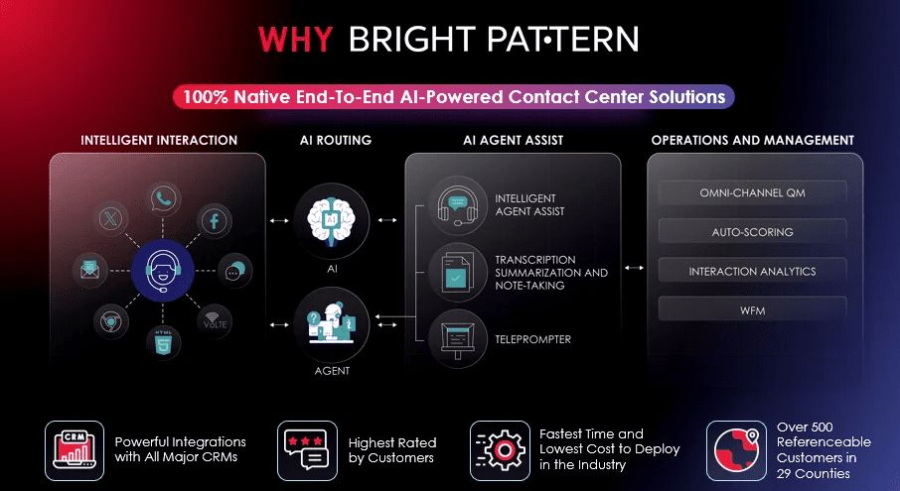
Businesses using Bright Pattern report faster response times, higher first-call resolution rates, and significant operational cost savings. Its integration with popular CRMs and workforce optimization tools further enhances automation capabilities, making it the go-to AI call center automation platform.
2. Genesys Cloud CX – Enterprise-Level AI Automation
Genesys Cloud CX leverages AI to automate call routing, enable self-service, and provide virtual agents for customer interactions. Its predictive analytics, workforce optimization, and AI-powered chatbots help enterprises improve efficiency and reduce costs. While highly advanced, Genesys’ solution requires some configuration effort, which may be more suitable for larger organizations with complex contact center needs.
3. Talkdesk – Automation-Focused AI for Fast Response
Talkdesk combines AI-driven automation with user-friendly dashboards and real-time insights. Its AI-assisted tools help with call summarization, sentiment detection, and SLA compliance. Talkdesk is particularly effective for mid-sized businesses that want automated routing and workflow efficiency without excessive technical complexity.
4. Five9 – AI Automation for Enhanced Productivity
Five9 focuses on predictive dialing, intelligent routing, and virtual agents, automating both inbound and outbound interactions. Its AI reduces manual work, predicts customer needs, and personalizes interactions. Companies using Five9 report reduced average handle time and improved agent productivity.
5. Zendesk AI – Automated Support Across Channels
Zendesk automates ticket handling, routing, and responses using AI, making customer support faster and more consistent. Its AI works across multiple channels, including voice when integrated with phone systems. Zendesk is ideal for businesses looking for combined helpdesk automation and AI-driven call center capabilities.
6. Cisco Contact Center AI – Secure, Enterprise-Class Automation
Cisco offers AI-driven virtual agents, natural language processing, and automated routing for large enterprises. Its AI automates repetitive tasks, enhances customer experience, and provides deep analytics to identify trends. Cisco’s solution is tailored for organizations requiring high security and large-scale deployment.
7. Twilio Flex – Customizable AI Call Center Automation
Twilio Flex allows developers to create customized automated workflows with AI-powered routing, chatbots, and programmable actions. While it requires technical expertise, it provides unmatched flexibility for businesses wanting to design unique automated experiences.
8. HubSpot Service Hub – AI Automation for Growing Teams
HubSpot Service Hub automates ticket routing, knowledge base suggestions, and follow-ups using AI. Its integration with HubSpot CRM ensures smooth workflows, making it an ideal solution for small and mid-sized businesses seeking efficient, automated support.
Why teams invest in call center automation AI
Customer expectations keep rising: faster answers, fewer transfers, and consistent service across channels. At the same time, contact centers face staffing constraints, training challenges, seasonal spikes, and pressure to control costs. Call center automation AI helps because it is designed to:
- Scale instantly during peak demand without proportional increases in headcount.
- Reduce repetitive workload by deflecting routine inquiries and automating after-call tasks.
- Increase consistency by standardizing responses and surfacing approved knowledge.
- Improve service speed with faster identification of intent and quicker access to answers.
- Support agents with real-time coaching and reduced cognitive load.
In many operations, the largest gains come from small improvements applied across thousands (or millions) of contacts per year: shaving seconds off handle time, preventing unnecessary transfers, and reducing rework through better documentation.
High-impact benefits of call center automation AI
1) Faster resolution and lower average handle time (AHT)
AI can shorten calls and chats by automating customer verification steps (where appropriate), pulling relevant account information, suggesting next-best actions, and generating concise summaries for case notes. Agent assist can also reduce time spent searching knowledge bases.
2) Higher first contact resolution (FCR)
By identifying intent early and routing to the right team, AI helps customers reach the best resource sooner. During the interaction, agent assist can surface troubleshooting steps, policy guidance, or required disclosures that reduce escalations and repeat contacts.
3) Better customer experience (CSAT and NPS)
Customers benefit from quicker answers, fewer transfers, and more consistent service. AI also enables 24/7 support for routine tasks, which is especially valuable for global audiences and time-sensitive issues.
4) Stronger agent experience and retention
Automation AI can reduce monotonous tasks like copy-pasting, tagging dispositions, and writing long summaries. When agents spend more time solving meaningful problems (and less time on clerical work), job satisfaction can improve, which often supports retention.
5) Improved quality and compliance at scale
Automated interaction analysis can help ensure that required statements are delivered, sensitive topics are handled properly, and coaching is targeted to specific skills. This is particularly valuable for regulated environments where consistent adherence matters.
6) Data-driven operations and continuous improvement
AI-driven analytics can highlight why customers contact you, where journeys break, which policies cause confusion, and what knowledge gaps slow agents down. This insight supports better self-service content, improved processes, and more effective training.
Where call center automation AI delivers the biggest wins
Not every workflow should be automated first. The most successful programs focus on high-volume, repeatable interactions with clear outcomes and low risk. Common high-value areas include:
Common use cases
- Order status and shipment tracking (answering “Where is my order?” quickly and accurately).
- Password resets and account access (guiding customers through secure recovery flows).
- Billing and payment questions (explaining charges, sending receipts, payment arrangements where allowed).
- Appointment scheduling (booking, rescheduling, reminders).
- Simple troubleshooting (guided steps for known issues with clear pass / fail outcomes).
- FAQs and policy explanations (returns, eligibility, service limits).
- Lead qualification (capturing intent, basic details, and routing to sales).
AI that supports (not replaces) agents
- Real-time knowledge suggestions based on customer intent.
- Response drafting for chat or email with approved tone and policy alignment.
- Summaries and next steps for wrap-up to speed documentation.
- Coaching prompts for de-escalation and empathy cues based on detected sentiment.
Key components of a call center automation AI stack
A practical call center automation AI program usually includes several layers working together:
Channels and interaction capture
- Voice, chat, email, SMS, and social messaging (depending on your support model).
- Transcription for voice interactions (ASR) to enable downstream AI features.
Conversation intelligence
- Intent detection and entity extraction (for example, order number, product type, plan name).
- Sentiment and topic modeling to detect frustration, urgency, or churn risk.
Automation and orchestration
- Workflow automation for tasks like opening cases, updating fields, or triggering follow-ups.
- Business rules that define what AI can do automatically versus what requires approval.
Knowledge and content
- A maintained knowledge base with accurate, approved answers.
- Content governance so AI suggestions stay aligned to current policies.
Integrations
- CRM and ticketing systems for case creation and updates.
- Order management, billing, identity systems, and product databases for accurate responses.
Security, privacy, and compliance controls
- Role-based access and audit trails.
- Data minimization and appropriate handling of sensitive information.
- Human-in-the-loop review for higher-risk scenarios.
Virtual agents vs. agent assist vs. workflow automation
Call center automation AI is not one feature; it is a portfolio. Many organizations see the fastest results by starting with agent assist and post-call automation, then expanding to virtual agents as knowledge and workflows mature.
| Approach | Best for | Primary benefit | Typical success signal |
|---|---|---|---|
| Virtual agent | High-volume, repeatable questions and transactions | Deflects contacts and provides 24/7 service | Containment rate and customer effort reduction |
| Agent assist | Complex interactions where humans remain primary | Improves speed, accuracy, and consistency | Lower AHT and higher FCR |
| Post-contact automation | Wrap-up notes, dispositions, follow-ups | Reduces after-call work (ACW) and boosts data quality | Lower ACW and better CRM completeness |
| Quality automation | Large-scale QA and compliance monitoring | Finds issues earlier and targets coaching | Higher QA coverage and fewer compliance misses |
| Intelligent routing | Organizations with multiple queues and skills | Fewer transfers and faster resolution | Lower transfer rate and improved speed-to-answer |
A step-by-step plan to implement call center automation AI
Step 1: Pick the right starting point (based on volume and clarity)
Start with 2 to 5 use cases that are:
- Frequent (large share of contacts).
- Well-defined (clear inputs and expected outcomes).
- Low to moderate risk (minimal chance of harm if handled incorrectly).
- Measurable (you can track AHT, FCR, containment, and CSAT changes).
Examples include order status, appointment changes, or simple account questions.
Step 2: Audit knowledge and define “source of truth”
Automation AI is only as good as the information it can rely on. Before scaling:
- Consolidate duplicate or conflicting knowledge articles.
- Identify owners for policy content (who updates it and when).
- Define which systems are authoritative for account status, billing, eligibility, and product info.
Step 3: Design safe conversation flows and escalation paths
Even with advanced AI, strong customer experiences come from well-designed flows:
- Clear intent confirmation (“I can help with billing questions. Is this about a recent charge?”).
- Fast escape hatches to a human agent (especially for high emotion, complex cases, or repeated failures).
- Fallback responses that stay helpful without guessing.
Step 4: Integrate with CRM and core systems
Automation becomes truly valuable when it can take action, not just answer questions. Common integrations include:
- Creating or updating tickets.
- Capturing contact reason and outcome codes.
- Triggering follow-up tasks and confirmations.
Step 5: Pilot, measure, and iterate
Run a controlled pilot with clear metrics. Make it easy for agents and supervisors to report issues and propose improvements. Early iterations often focus on:
- Reducing incorrect intent matches.
- Improving the relevance of suggested knowledge.
- Refining summaries so they capture the right details for the CRM.
Step 6: Operationalize with governance and continuous improvement
To sustain results, establish:
- Content governance for knowledge updates and approvals.
- Model governance for evaluating changes and preventing regressions.
- Analytics cadence (weekly or monthly reviews of top intents, deflection, and failure reasons).
Practical examples: what AI can automate in a real contact
Here is a simplified view of how AI-driven automation can support an end-to-end interaction without sacrificing control.
Customer message: “My last bill is higher than usual.” 1) Intent detection: Billing > Unexpected charge
2) Entity capture: Account ID (from authenticated session)
3) Data pull: Last invoice summary, recent add-ons, prorations
4) Agent assist (or virtual agent response): - Explains common causes (proration, add-on services) - Highlights the specific line item that changed - Suggests next step: review plan, remove add-on, open dispute
5) Workflow automation: - Creates a case with the right category - Saves a short summary and next action
6) Escalation rule: - If fraud keywords or high sentiment risk, route to specialist queue
This pattern repeats across many contact types: detect intent, gather required details, retrieve accurate data, present an approved explanation, take action in systems, and escalate when needed.
Measuring success: the metrics that matter
To keep your automation AI program aligned to real outcomes, measure both experience and efficiency metrics.
Customer experience metrics
- CSAT and NPS (overall and by intent).
- Customer effort indicators (repeat contacts, transfer rate, time to resolution).
- Containment quality (whether self-service solved the problem, not just ended the session).
Operational efficiency metrics
- AHT and ACW (after-call work).
- FCR (first contact resolution).
- Cost per contact (voice vs. digital, assisted vs. automated).
- Agent productivity (contacts handled per hour, time spent searching knowledge).
Quality and risk metrics
- QA coverage (percentage of interactions evaluated).
- Compliance adherence (required disclosures, policy alignment).
- Escalation accuracy (routing the right cases to the right team).
A strong measurement approach also looks at changes by customer segment, channel, and intent category, so improvements are not hiding issues in specific areas.
Success stories: what “good” looks like in practice
While results vary by industry and maturity, many teams report meaningful improvements when they launch automation AI with clear use cases and solid knowledge foundations. Here are representative success patterns that show what’s achievable:
Story 1: Faster onboarding for new agents
A mid-size service organization introduced real-time agent assist that suggested knowledge articles and drafted responses for chat. Supervisors reported that new agents became productive sooner because they could follow consistent, approved guidance during live interactions. The visible outcome was smoother ramp periods and more consistent resolution steps.
Story 2: Reduced wrap-up time with automated summaries
A contact center with heavy case documentation adopted automated call summarization and disposition suggestions. Agents spent less time writing notes and more time helping customers. Operations leaders also saw more consistent CRM fields, which made reporting and follow-up workflows more reliable.
Story 3: Better routing and fewer transfers
A multi-queue support team implemented intent-based routing across chat and voice. Customers were more frequently connected to specialized agents on the first try, leading to fewer transfers and a more seamless experience.
These examples share a theme: automation AI delivers the biggest benefits when it is tied to specific workflows, backed by accurate knowledge, and measured with clear KPIs.
Best practices to keep automation AI accurate and trustworthy
Use “assist first” to build confidence
If you want quick wins with lower risk, deploy AI to support agents before pushing full self-service. This lets your team validate knowledge suggestions, summaries, and routing logic with human oversight.
Keep answers grounded in approved knowledge
For customer-facing answers, align AI output to a curated knowledge base and current policies. In practice, this means:
- Maintaining a single source of truth for key topics.
- Regularly reviewing top intents and updating content.
- Designing responses to avoid speculation when data is missing.
Design for graceful escalation
The best automated experiences make it easy to reach a human when needed. This is especially important for:
- Complex billing disputes
- Vulnerable customers or sensitive situations
- High-value accounts
- Repeated failed self-service attempts
Invest in change management and training
Automation AI works best when agents trust it and know how to use it. Practical steps include:
- Training agents on when to rely on AI suggestions and when to override them.
- Giving supervisors dashboards and coaching workflows tied to AI insights.
- Creating a feedback loop so agents can flag incorrect suggestions quickly.
Common questions about call center automation AI
Will automation AI replace my agents?
In most real-world contact centers, the highest value comes from combining automation with human support. AI is excellent at handling repetitive tasks and surfacing information quickly, while agents remain essential for complex problem-solving, empathy, negotiation, and exception handling.
Which channel should I automate first: voice or chat?
Many teams start with chat because it is easier to structure and measure, and it avoids the complexity of speech recognition and noisy audio. However, agent assist and post-call automation for voice can also deliver strong benefits quickly, particularly if voice volume is high.
How do you keep answers consistent and policy-compliant?
Consistency comes from strong knowledge governance, clear approval processes, and designing AI responses to use approved content. Automated QA and regular reviews of top intents also help keep experiences aligned with current policies.
What should we automate first for the fastest ROI?
High-volume, well-defined intents (order status, appointment changes, password resets) are common starting points. Internally, automated summaries and disposition suggestions can reduce after-call work and improve data quality quickly.
Getting started: a simple checklist
- Define goals: CSAT, AHT, FCR, containment, ACW reduction.
- Select top intents by volume and clarity.
- Clean up knowledge and establish owners.
- Map workflows and escalation rules.
- Integrate systems (CRM, ticketing, order, billing).
- Pilot and measure with a tight feedback loop.
- Scale gradually and expand to new intents and channels.
Conclusion: automation AI as a growth engine for service
Call center automation AI can be a powerful advantage for organizations that want faster service, happier customers, and more empowered agents. By starting with the right use cases, grounding AI in accurate knowledge, and measuring outcomes that matter, you can create a support operation that scales with demand while improving quality and consistency.
The most compelling results come from treating automation AI as an ongoing program, not a one-time tool: iterate, learn from real interactions, and keep aligning automation to customer needs and business priorities.
